
AWARD BADGES: GAMIFICATION · MOBILE · ENTERPRISE UX
CREATING ACHIEVEMENTS LEARNERS ACTUALLY CARE ABOUT
Schoox's badges were digital noise nobody looked at. I rebuilt the mobile awarding flow so managers could recognize great work the second they saw it, and one customer eventually built an entire five-level certification system around it.
ROLE
Product Designer (Mobile)
TIMELINE
2+ sprints (2024)
TEAM
Product Manager · Illustrator · Engineer · Design Systems
TOOLS & SKILLS
Figma · Mobile UX · User Testing · Design Systems
2 min read

AWARD BADGES - REDESIGNED MOBILE AWARDING FLOW
Built mobile-first and aligned to Schoox's broader design system; so awarding a badge feels fast on a phone and premium to receive.
THE BRIEF
Rewards that felt like noise, not recognition.
I rebuilt how learners get awarded on mobile; turning boring corporate milestones into achievements that feel earned.
Badges weren't some side feature. They were one of Schoox's biggest selling points, helping win new clients and giving existing ones a reason to renew. The problem was that actually using them was frustrating enough that customers weren't getting nearly as much value out of the feature as they could.
Managers saw the app's rewards as pointless digital noise. The workflow was so clunky they couldn't hand out a badge in the moment a learner did something great, and searching hundreds of badge types across thousands of employees on a phone was unmanageable. Instead of making learners feel proud, awarding felt like an administrative headache nobody wanted to touch.
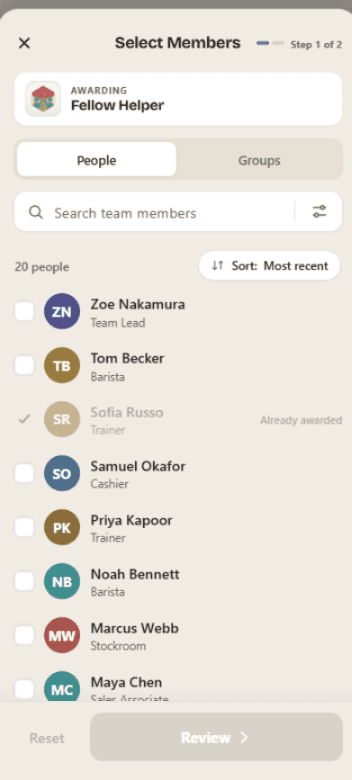
AWARD BADGES - MOBILE-FIRST RECOGNITION
THE INSIGHT
Generic participation trophies don't work.
Research confirmed the hunch: learners ignore generic badges, and managers only handed them out for mandatory HR completions; never to celebrate great work in the moment.
Scarcity & Status
A badge only looks impressive on a profile if the UI makes a hard-earned, high-tier achievement look completely different from a basic participation mark.
Awarding Velocity
Managers won't waste time on their phones. If searching thousands of employees and assigning a badge takes more than a few taps, they abandon the feature.
Instant Feedback
Mobile moments are fast. The success state has to be visually undeniable so a manager knows the badge sent; and doesn't fire it twice.
USER TESTING
The fixes came from watching managers, not moving buttons.
Badge creation was deferred, so testing focused on the one thing that mattered: how fast a manager could find and hand out a reward on a phone.
Awarding a whole team, not one tap at a time
INSIGHT
Watching managers select 100+ learners one-by-one on a phone showed how tedious the old layout really was.
ACTION
Rebuilt filtering for fast multi-selection; whole locations, org units, or custom groups get a team reward in a couple of taps.
A confirmation managers actually trust
INSIGHT
The old confirmation was so subtle managers re-tapped, unsure it sent; and accidentally awarded duplicates.
ACTION
Built a bold, satisfying “Badge Awarded!” moment with the design-systems team, giving instant confirmation and killing duplicates.
One list instead of three confusing tabs
INSIGHT
Badges were split across “System,” “Corporate,” and “Group” tabs, forcing managers to jump around to find one.
ACTION
Rolled everything into a single view with quick-tap filters up top, so managers narrow the list instantly without switching screens.
BEFORE / AFTER · BADGES SCREEN

BEFORE
REVIEW BADGES SCREEN
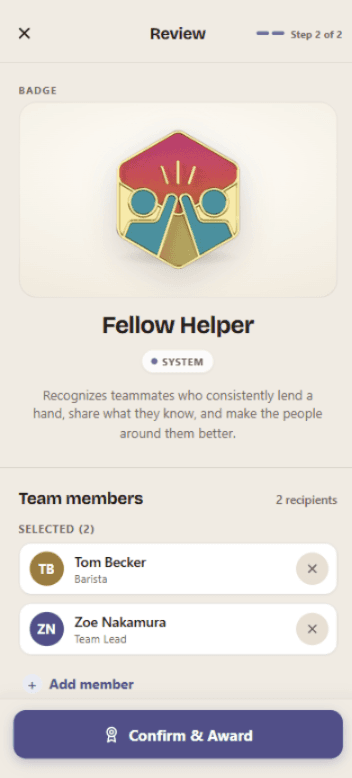
AFTER
REVIEW BADGES SCREEN
IMPACT
Badges became the core of how managers run their teams.
Sport Clips built an entire five-level certification system on top of the redesigned badge flow. Managers use it weekly.
"Our team members enjoy healthy competition, earning badges, and receiving recognition for training they've completed."
— Jonathan Sorber, Learning Development Manager at Sport Clips
Sport Clips developed a "level up" system where team members can participate in training activities to earn badges at five levels. These badges can be customized; the fifth level marks an individual as a "certified manager."
The takeaway I carried out: on a tight mobile screen, the hardest design work is the invisible logic, not the layout. Being forced to cut badge creation was a gift; it let me perfect the one flow managers actually use on the go, the real driver of engagement.
MORE CASE STUDIES
