social feed
SCHOOX
Making it EASY FOR teams to connect and reply instantly
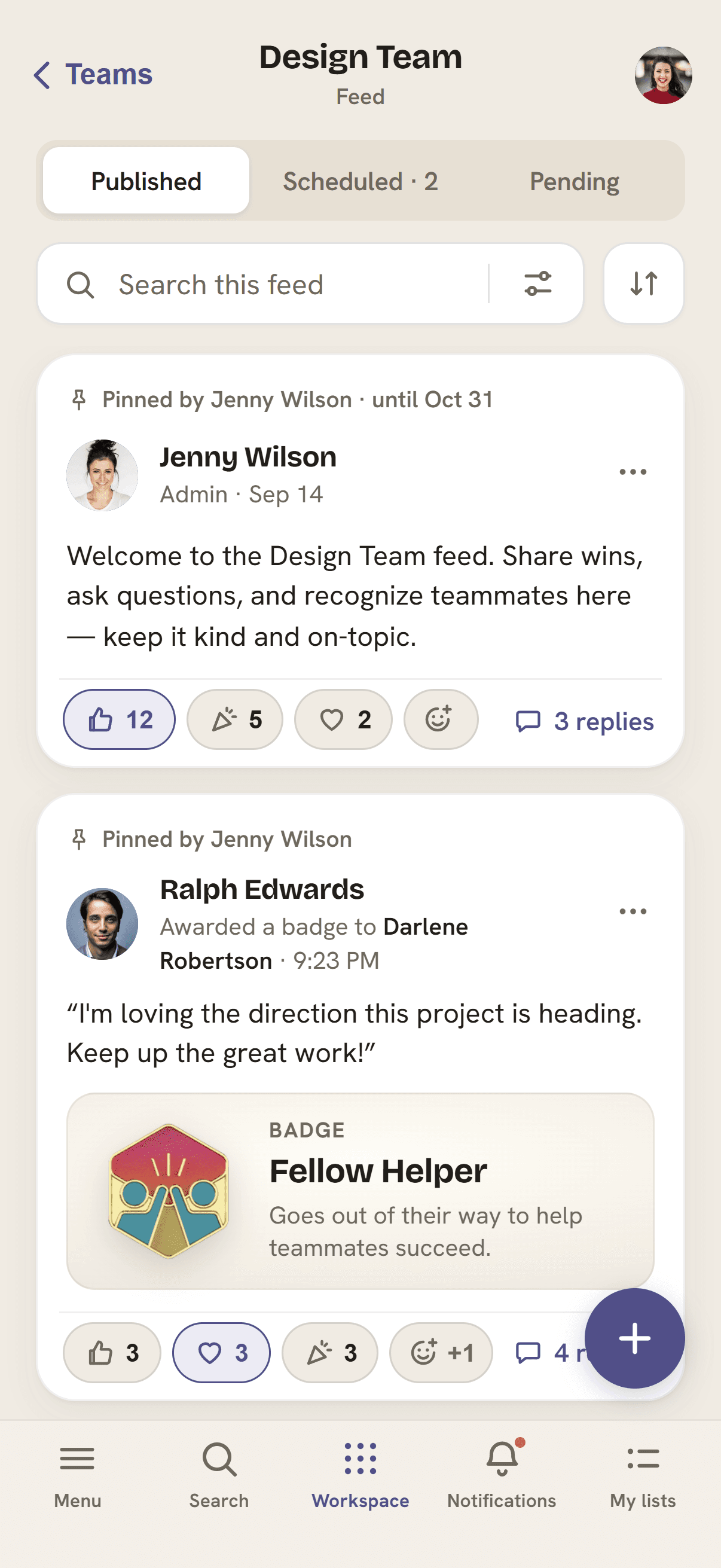
Completely redesigned the mobile feed layout to destroy the friction of typing out long responses on a phone. By making interactions fast, light, and visual, we closed the communication gaps between dispersed teams and built an experience that people actually want to engage with during a hectic workday.
RESPONSIBILITIES
Product Designer (Mobile)
RESPONSIBILITIES
Mobile Redesign, Social Interaction Flow Optimization, Design System Compliance
COLLABORATORS
CEO, Engineers, Product Designer (Web), UX Researcher, Design Systems
YEAR
2024
OVERVIEW
I led the UX and UI redesign of the Social Feed experience for our mobile Learning Management System (LMS) app. While another designer handled the web version of the feed, my job was to adapt those new engagement features specifically for a mobile screen. Together, our goal was to take a stale, fragmented discussion board and turn it into a lively community space. By restructuring the mobile layout, I made it incredibly simple for team members to post, reply, and react straight from their phones, using UX Cam data to find and eliminate hidden mobile friction points.
GOALS
01 Build a natural mobile social experience: Translate core social habits - like posting, replying, and leaving reactions - into smooth mobile gestures without cluttering or distracting from the app's main learning and study areas.
02 Keep the experience cohesive across web and mobile: Partner closely with our web designer and design systems team so that using the feed feels completely seamless and valuable, whether a user is on a phone or at a desktop.
03 Track behavior to cut out engagement friction: Use real-world usage data from UX Cam to prove that simplifying our mobile interaction layouts directly increases day-to-day team participation and activity.
THE CHALLENGE
The original mobile social feed was treated as an afterthought; it was essentially just a lazy copy-paste of the desktop website that completely ignored how people actually use a phone. Users found themselves trapped in messy, deeply nested comment threads, while the bland, colorless reaction icons offered zero satisfying feedback or social proof. To make matters worse, busy managers on the move couldn’t even pin or schedule critical announcements from their phones. All this mobile friction completely choked off genuine team communication, stopping our platform from becoming the vibrant, collaborative learning hub it was meant to be.
BUSINESS NEED
Boost user retention and daily activity across both web and mobile by building a seamless, unified engagement system that keeps teams connected no matter what device they use.
USER NEED
Team members need a clean, effortless mobile feed where they can celebrate wins, ask for help, and catch up with their coworkers instantly without jumping through administrative hoops.
DISCOVERY PHASE
To make sure adding a social feed wouldn't ruin or distract from the main study experience, I audited the mobile app's layout to find the most natural spaces to introduce community features. Instead of just guessing where things should go, I used UX Cam to watch exactly how students were already trying to talk to each other inside the app.
That research pointed us directly toward three mobile-first engagement pillars:
CONTEXTUAL DISCOVERY
We started surfacing student insights and trending discussions that matched the exact course a user was looking at right then. This kept the social content highly relevant to what they were studying and completely prevented 'feed fatigue.'
FRICITONLESS INTERACTION
We threw out the heavy, clunky comment boxes copied over from the web layout. In their place, we built modular, thumb-friendly tools that let users react or reply to a thread with a single tap.
VALIDATION LOOPS
We introduced high-contrast social proof - like bright reactions and custom badges - to give users instant recognition from their peers. Our UX Cam data proved this exact emotional validation was completely missing from the older version of the app.

PROBLEM TO SOLVE
Students and teams using the mobile app completely tuned out group discussions, treating them as chaotic background noise. Because basic social features like threading, pinning, and reacting were badly adapted for a mobile screen, the interface felt clunky and frustrating to use. This design friction made it incredibly difficult for scattered teams to have meaningful conversations, leaving mobile users feeling isolated and causing engagement to plummet compared to the desktop website.
RESEARCH
Gathering Insights
While general industry research showed that feeling isolated makes students drop out of online courses, our actual UX Cam data pointed to a much more specific problem: clunky mobile design was blocking people from interacting. We analyzed competitors like 360Learning and realized that mobile users constantly switch contexts, making 'contextual conversations' absolutely vital. If you want students to engage on a phone, the community features have to live directly alongside the study content.
From there, three major user experience themes came to light:
Emerging Themes
SATISFYING SOCIAL PROOF
A standard, boring web-style 'Like' button just didn't cut it on a phone. To get users interacting daily, we needed highly visual, high-contrast reactions that give people that instant hit of peer validation.
THREAD MANAGEMENT
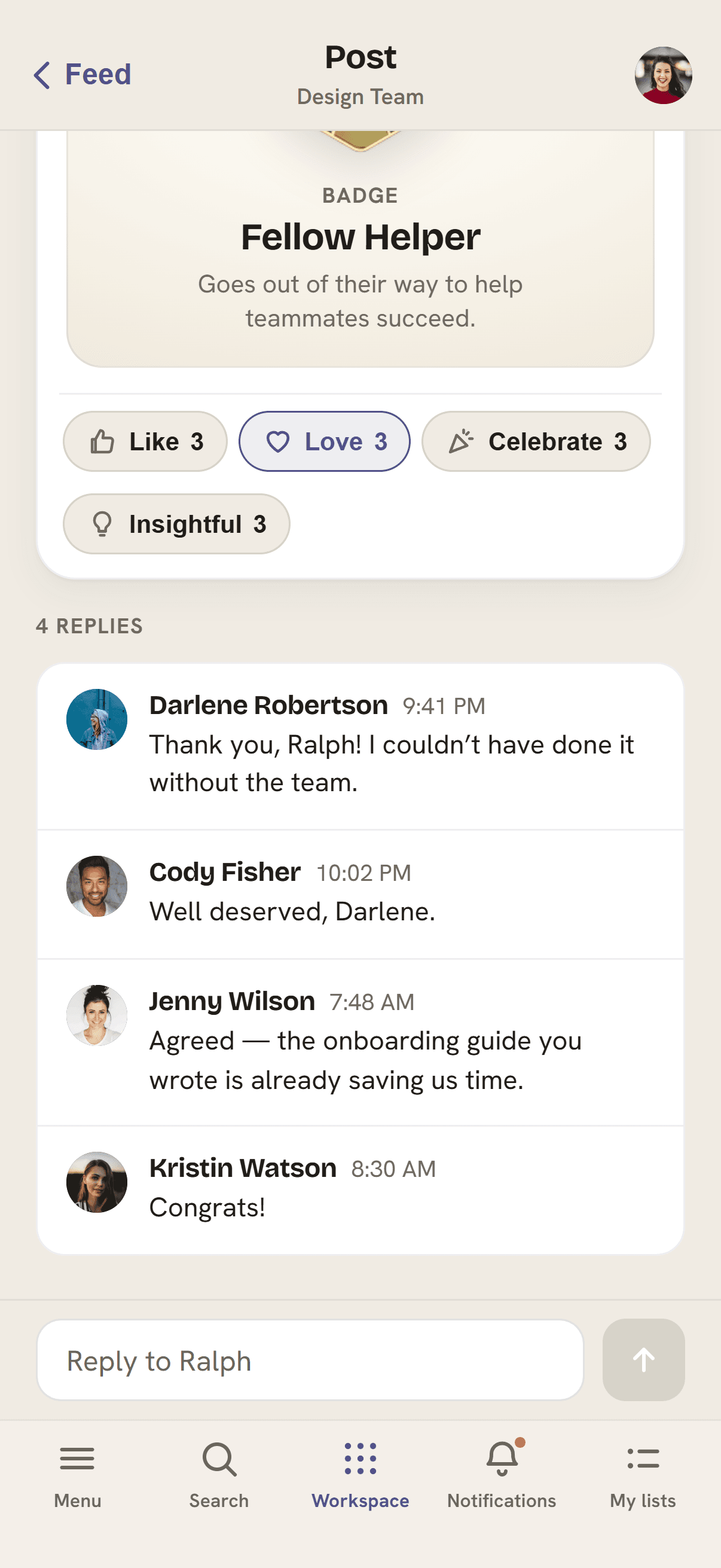
Our UX Cam session recordings showed that mobile users were frequently giving up and closing the app because they got tired of endless scrolling through flat, disorganized comment walls. We had to build a clean way to handle nested replies without breaking the layout on small screens.
MANAGEMENT ON-THE-MOVE
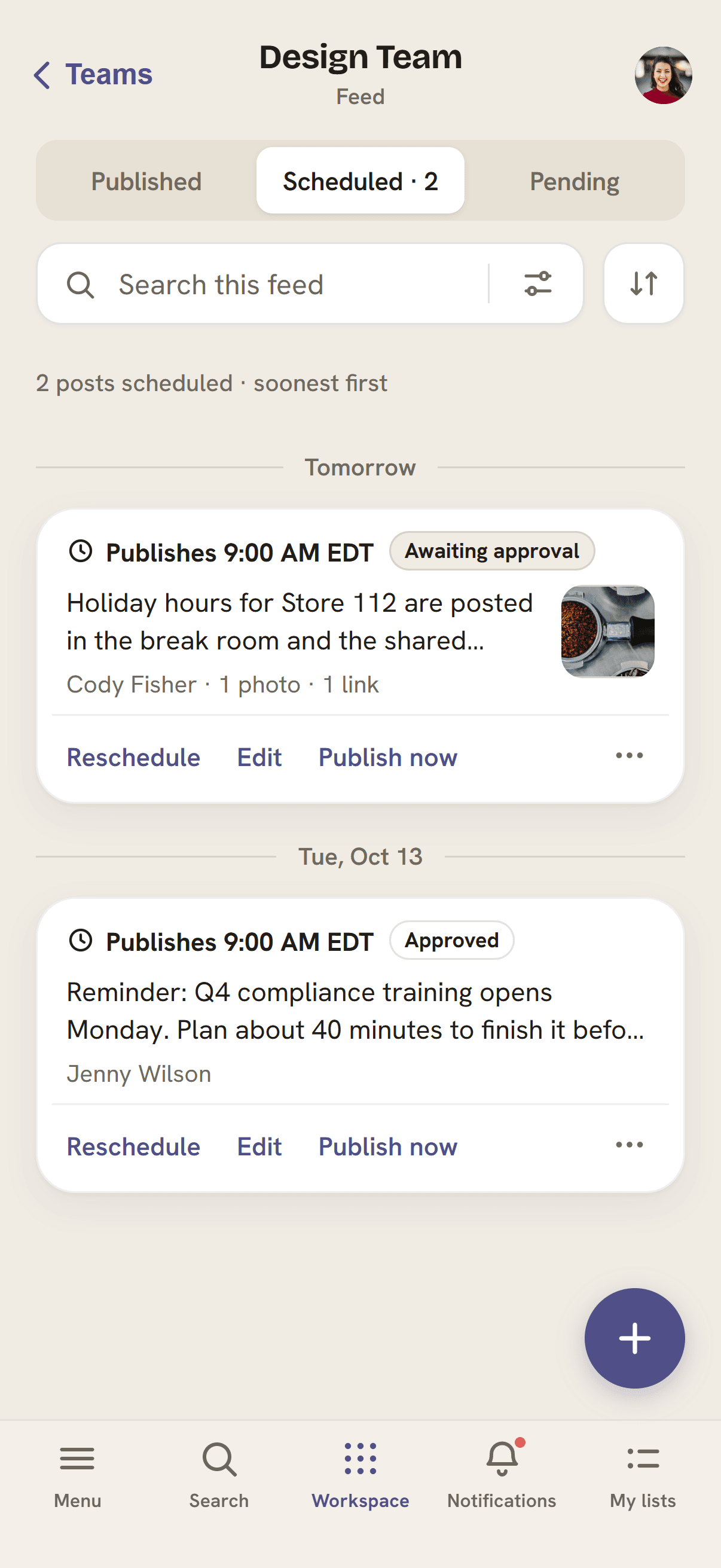
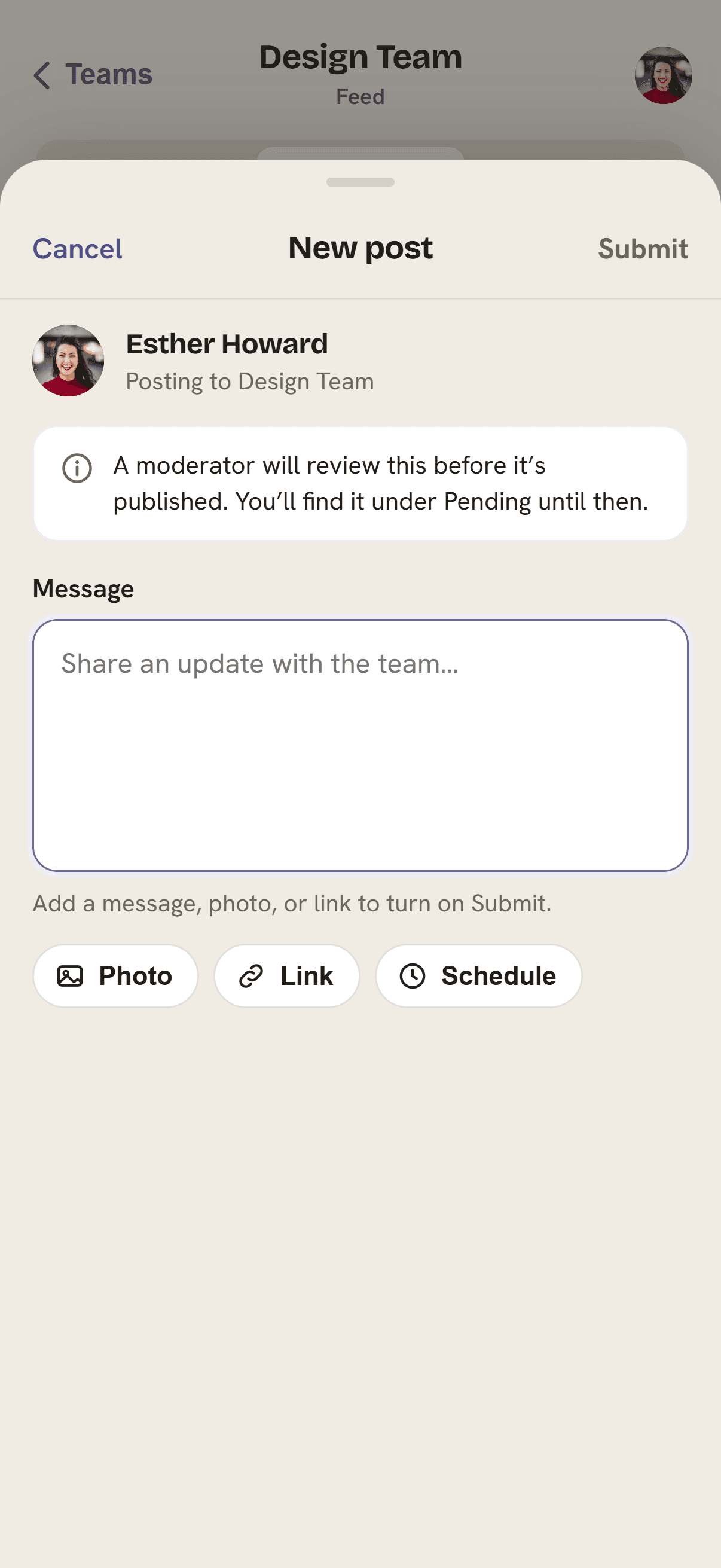
Team managers using the mobile app were completely handcuffed; they couldn't pin important updates, schedule posts, or approve student suggestions unless they logged into a desktop computer. We needed to put those full administrative tools right in their pockets.

360LEARNING (COMPETITOR) SCREENSHOT
HOW MIGHT WE
…use natural, thumb-friendly mobile layouts to make group chat feel rewarding and effortless for scattered teams, helping them build a lively community without distracting from their main study goals?
USER TESTING
Testing the Solution
We used UX Cam to run behavioral testing, putting our mobile prototypes directly in front of remote, field-based teams. When measuring success, we didn't care about cheap metrics like total clicks. Instead, we focused entirely on speed and ease: how quickly could a user spot a discussion that mattered to them and jump into the conversation?
Those user sessions exposed three critical flaws in our initial mobile layouts, which we immediately re-engineered:
What We Learned & How We Fixed It
EXPANDABLE REPLIES
Insight: UX Cam heatmaps confirmed that copying deep, indented desktop comment threads onto a phone completely broke the layout, making text squished and impossible to read.
Action: We switched to an 'Expandable Replies' design. We hide the long comment threads by default to keep the main feed clean, letting users dive into the full conversation with a single tap.
SATISFYING REACTIONS
Insight: Mobile users wanted physical, tactile feedback when interacting; they wanted to actually feel a reaction happen on their screen rather than just watching a tiny number counter tick up.
Action: We overhauled our reaction system. We introduced high-contrast color gradients and tuned the touch animations specifically for mobile screens, making every single tap feel incredibly responsive, smooth, and satisfying.
STATUS BLINDNESS (POSTING)
Insight: Testing with team managers revealed they were completely lost when trying to track which posts were drafts, pending review, or suggested by team members.
Action: We introduced clear, color-coded status tags. These instantly flag the status of a post so managers can review, sort, and approve content on the fly with one tap.
IMPACT
The Results
The mobile redesign completely bridged the gap between our desktop and mobile users, creating a single, seamless community space. By using real behavioral data to wipe out clunky, high-friction mobile layouts, we turned our phone app from a frustrating afterthought into a massive engine for user activity. Remote teams working on their feet can now stay in constant, effortless contact with their coworkers back at the office.
The overhaul completely transformed how users interact on their phones, delivering two major product wins:
Increased engagement for mobile-first social interactions
Reduced friction in mobile comment and reply flows
What I Learned From This Project
DATA OVER THEORY
While generic academic theories about 'social learning' sound great on paper, they don't mean anything without real-world proof. It takes concrete behavioral data - like watching actual UX Cam session recordings - to expose exactly why a standard desktop interaction pattern like deep comment threading completely falls apart on a mobile interface.
UNIFICATION IS NOT REPLICATION
Making a web layout 'work on mobile' is a lazy shortcut. To build a truly cohesive experience across platforms, you have to rewrite the feature's rules for a smaller screen. Leaving a high-contrast touch reaction on a phone needs to feel just as natural, rewarding, and important to the user as typing out a full reply on a desktop web browser.
CONSTRAINT IMPROVES INTERACTION VALUE
Designing around the harsh space limitations of a phone screen forced us to innovate rather than compromise. The mobile layouts we built out of necessity -like our expandable reply cards -proved to be so incredibly clean and effective that the core Design System team is now integrating them back into the main desktop platform.
PORTFOLIO
MORE CASE STUDIES
Tatami
Tatami
Tatami
LIVE APP
TRAINING DATA LOGIC
AI SHIPPED PRODUCT
Award Badges
Award Badges
Award Badges
MOBILE-FIRST ENTERPRISE
WORKFLOW OPTIMIZATION
B2B SAAS DESIGN